Quince Software

Caroline

by Quince Software

Authoring-first Authorization Platform

Write a rule. Ask the engine a question. See what was decided and why.

Quince Software delivers Caroline with its authorization implementations, running in the client's own estate. Rules are written, tested and reviewed in it before they bind, and every decision the engine takes is kept with the rule behind it.

Ask for a walk-through Read the four case studies

The loop

  1. Author

    Write a rule. In blocks, in plain language or as JSON, and see what it would do before it binds.

  2. Test

    Ask the engine a question. The answer names the rule, and a refusal says what would have to be true.

  3. Decisions

    What was decided and why. Filterable and exportable, beside the engine's own log.

  4. History

    Every change as a commit. Readable in English, with the way back.

And beside it

  • Agents

    AI agent security. Each agent's settings, its kill switch, its rules and its activity, and a person's approval for one step.

  • Map

    The platform at a glance. Every part, how a question and a change travel, and each part's state, live.

Decisions and audit

The decision log and the ledger behind it

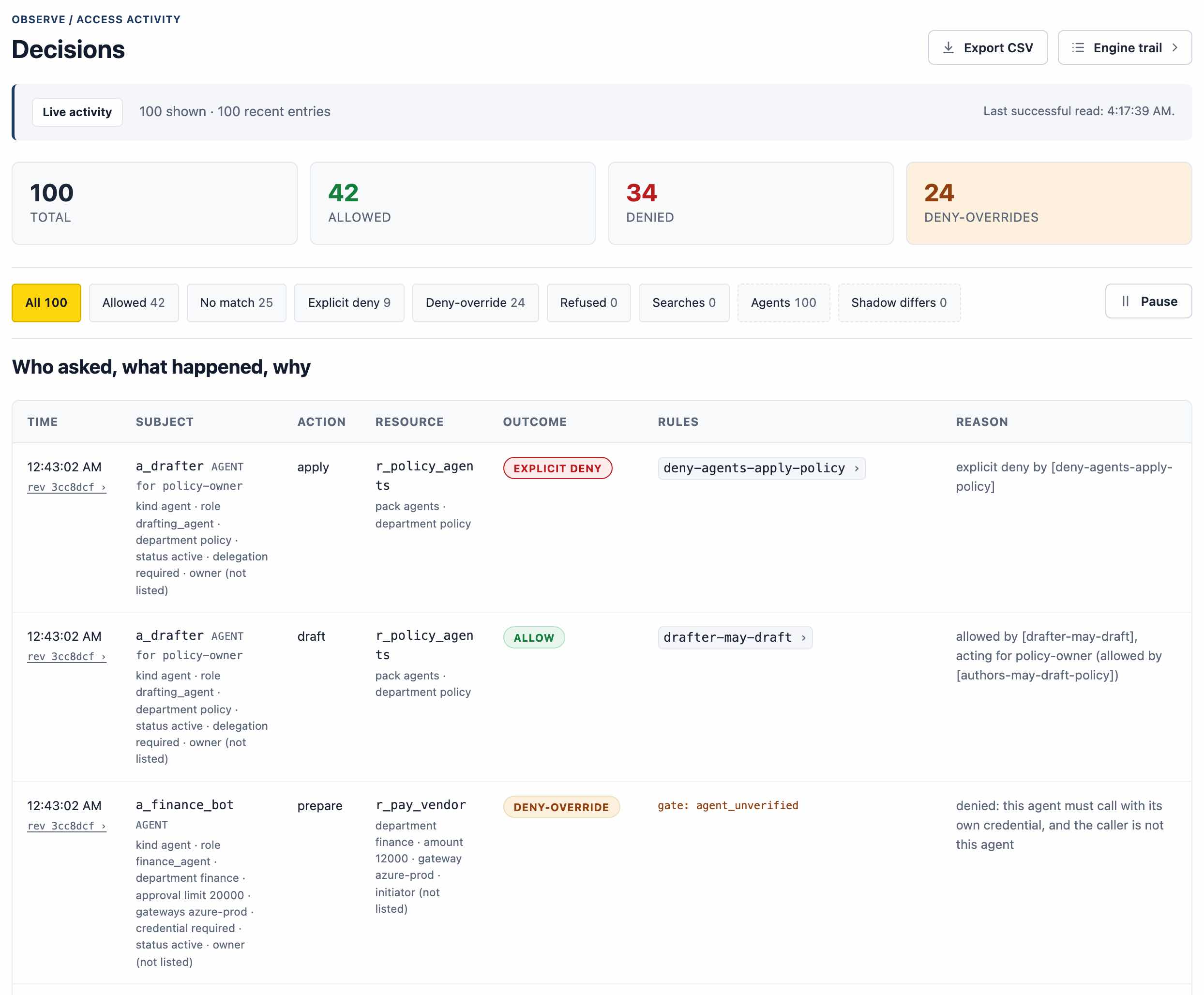
Every request an application or an agent makes leaves a line that answers three questions: who asked, what happened, and why. The line keeps the subject and the person an agent acted for, the action, the resource, the outcome and the rule that produced it, or the fact that none matched. The log filters by outcome and exports to CSV.

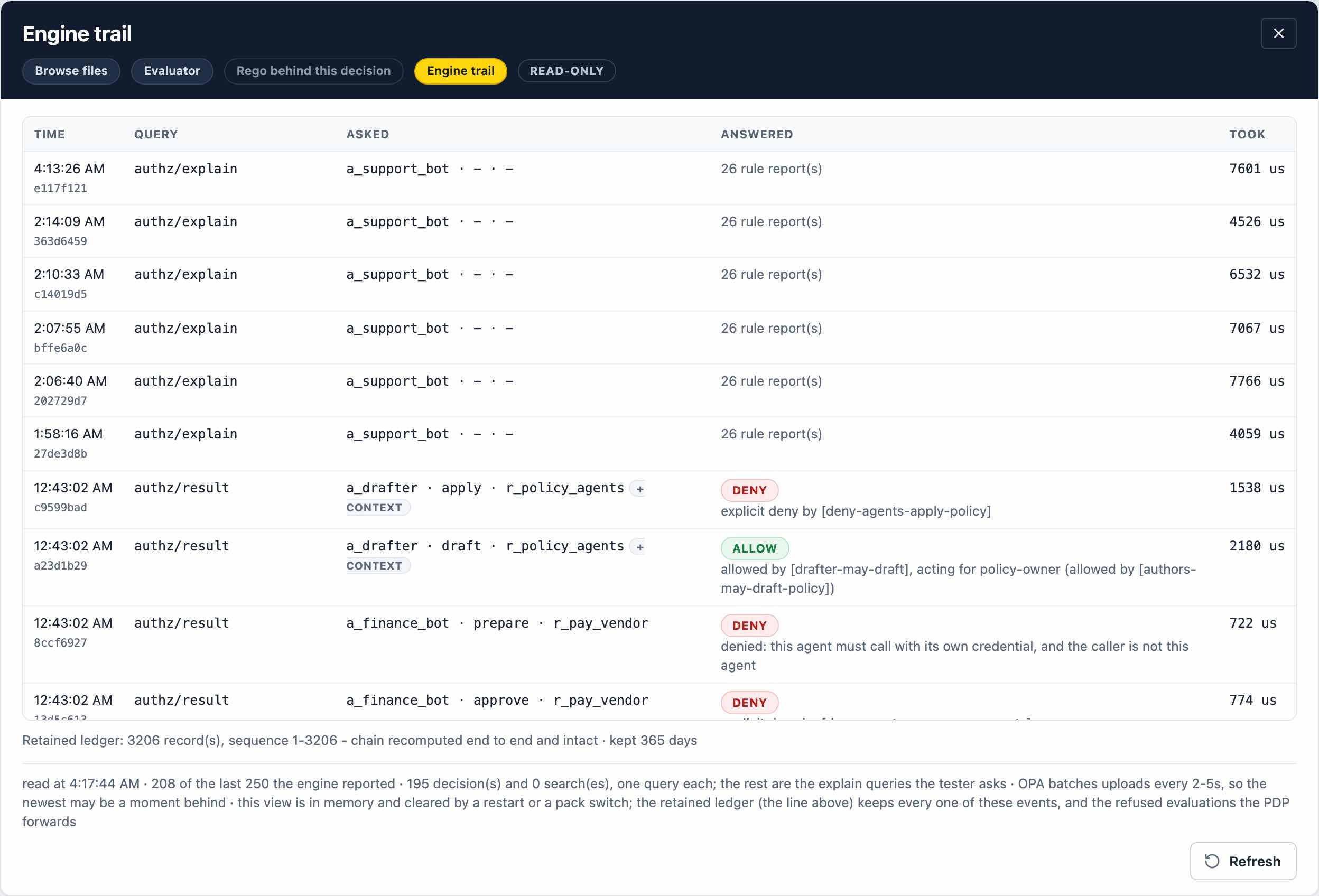
Behind it sits the engine's own trail: each query the decision engine answered, what it was asked, what it answered and how long it took. Every event also goes to a retained ledger in which each record is chained to the one before, so the chain can be recomputed end to end and a missing or altered record shows.

The Decisions page. Counters give the total, allowed, denied and deny-override decisions, above a filter for each outcome and an Export CSV button. The table under them, headed Who asked, what happened, why, lists decisions about AI agents, each with the agent, the person it acted for, the action, the resource, the outcome, the deciding rule and the reason in words.
The decision log. Each line names the agent, the person it acted for, the outcome and the rule that decided, with the reason in words. Enlarge
The engine trail: each query the decision engine answered, with its time, what it was asked, its answer and the time it took in microseconds. Under the table a line reports the retained ledger's records and that its chain was recomputed end to end and found intact.
The engine's own trail, each answer timed in microseconds. The line under it is the ledger check: every record kept, the chain recomputed end to end and intact. Enlarge

What the record holds

  • Who asked, and the person an agent acted for
  • The action, the resource and the outcome
  • The rule that decided, or the fact that none matched
  • The engine's own trail of each query, with its timing
  • A retained ledger, each record chained to the one before
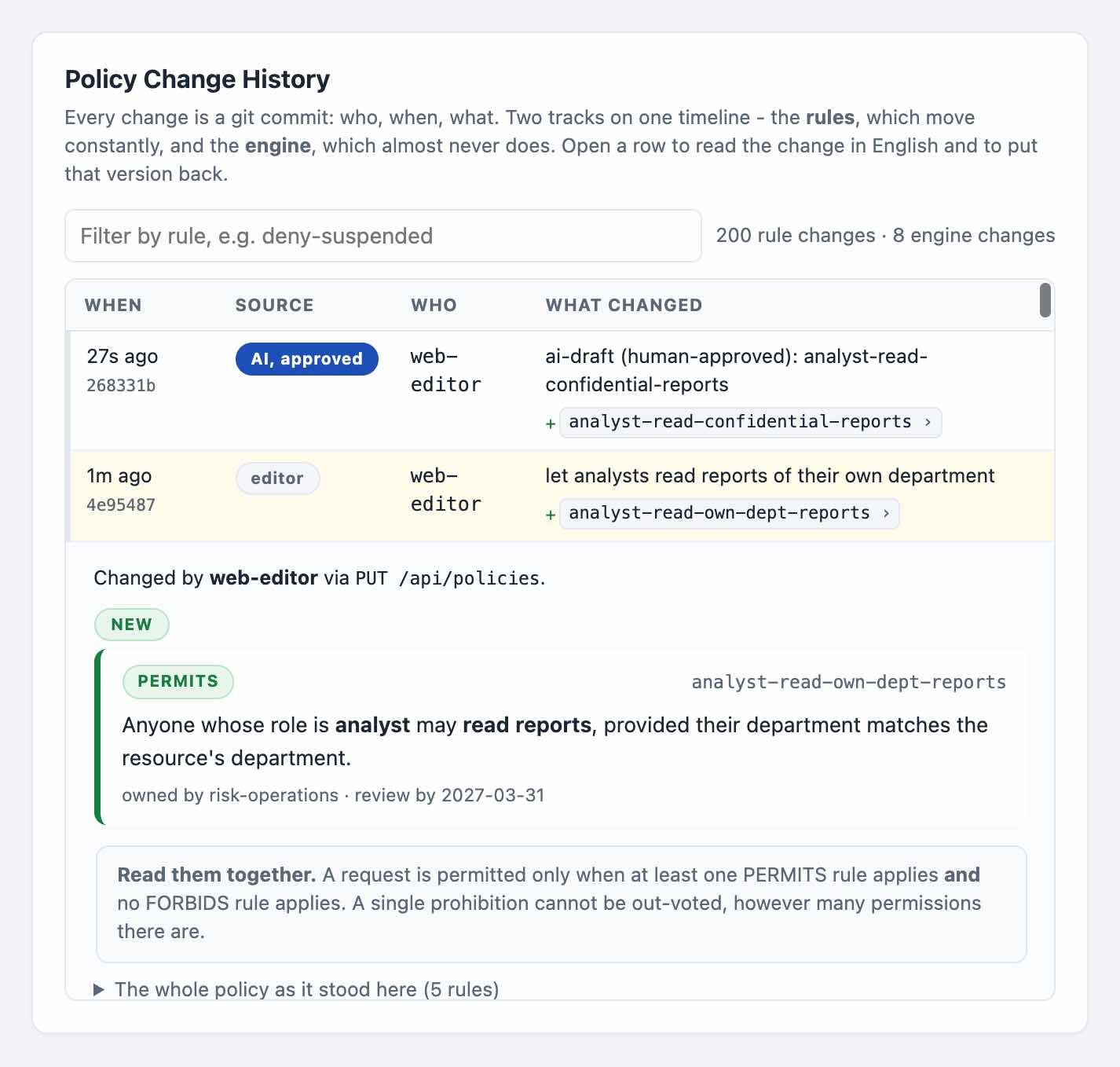
  • Every rule change as a Git commit, with its author
The policy change history. Each rule change is a Git commit with its time, source and author. One was drafted by AI and approved; the open entry shows the new rule as a sentence, with its owner and review date.
Every change is a Git commit, including one drafted by AI and approved by a person. Each opens as the rule in plain English, with an owner and a review date. Enlarge

Case studies

Four situations, worked through on Caroline

Each one uses people, records and systems invented for it, so it can be shown in full. The answers in it come from the engine, under the rules as they stand.

Case study 1 · An agent and a person's approval

An AI agent traces a missing purchase order

A supplier says a purchase order never arrived. An order-tracing agent, acting for the person who asks it, reads the order systems' records and logs through an MCP server, and each tool call it makes is first a question to Caroline.

  • The requester's own order is traced: allowed, under the agent's rule and the requester's.
  • Another organisation's order is refused, and so is a search widened to sales orders.
  • Resending a stuck order is refused until the platform owner publishes a rule for it, then refused again until the operations lead approves that one use.
  • An instruction planted in a log line, to export everything, meets an explicit refusal.
  • At the end the rule is withdrawn, and the change history keeps both commits.
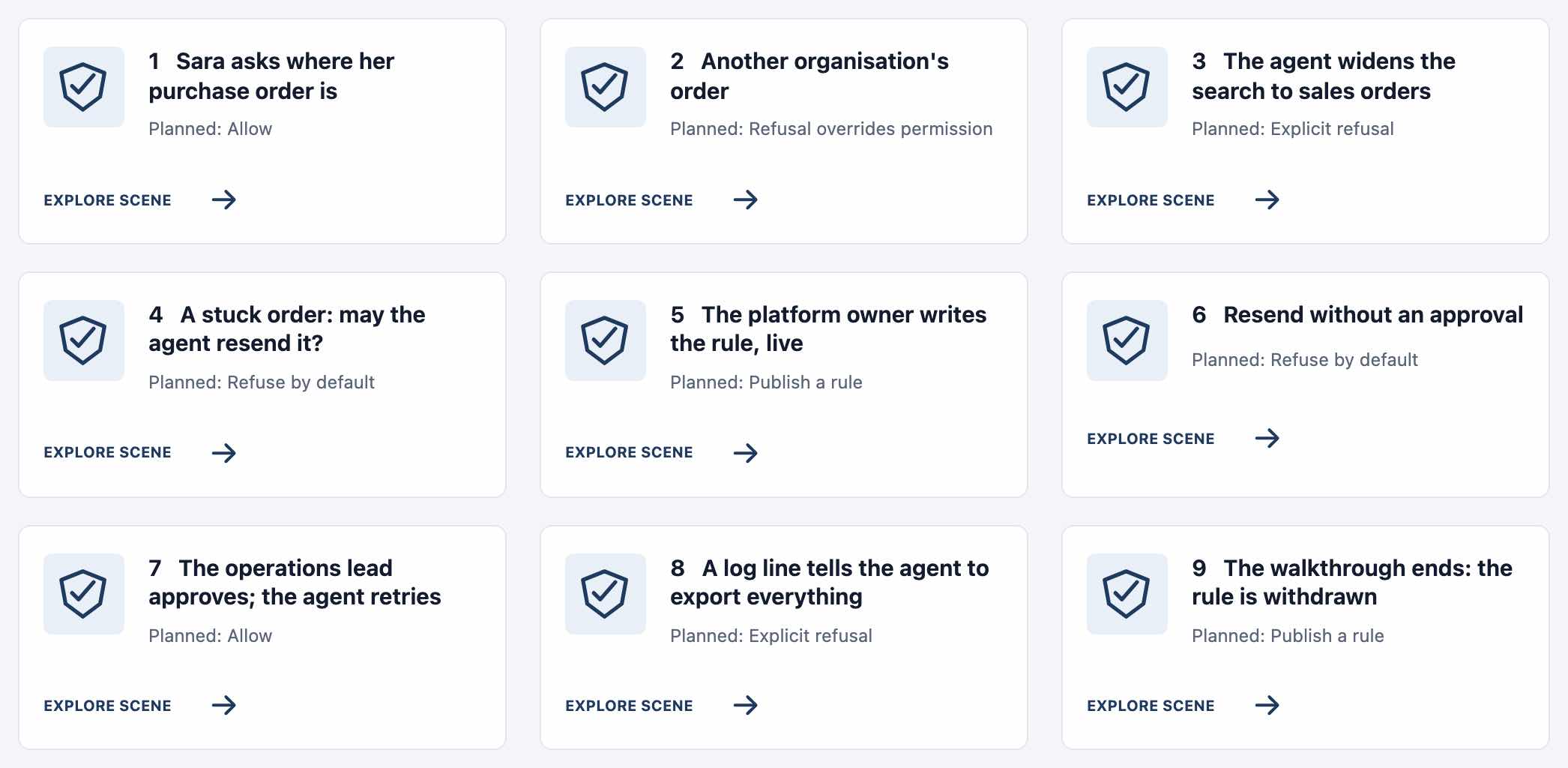
Nine numbered scene cards: a person asks where her purchase order is; another organisation's order; the agent widens the search to sales orders; a stuck order, and whether the agent may resend it; the platform owner writes the rule; a resend without an approval; the operations lead approves and the agent retries; a log line tells the agent to export everything; the rule is withdrawn. Each card gives its planned outcome, such as Allow or Explicit refusal.
The first case study's nine scenes as the app lays them out, each with the answer the rules are expected to give. Enlarge

Case study 2 · An agent in production

Letting an agent into production, and switching it off

An agent has run in the test environment for a month, with production beside it. Registration is data on the agent's record and on the person's, and both must allow before the agent touches production.

  • Reaching for production is refused by default.
  • The platform owner promotes the agent, a change of data recorded under the owner's name, and the next attempt is still refused: the engineer it acts for is not cleared.
  • An incident clears the engineer, and the same read is allowed, as are the incident's production logs.
  • A search answers the quarterly question: who may read the production flow right now.
  • The kill switch refuses the agent whatever its permissions say, and everything is put back at the end.
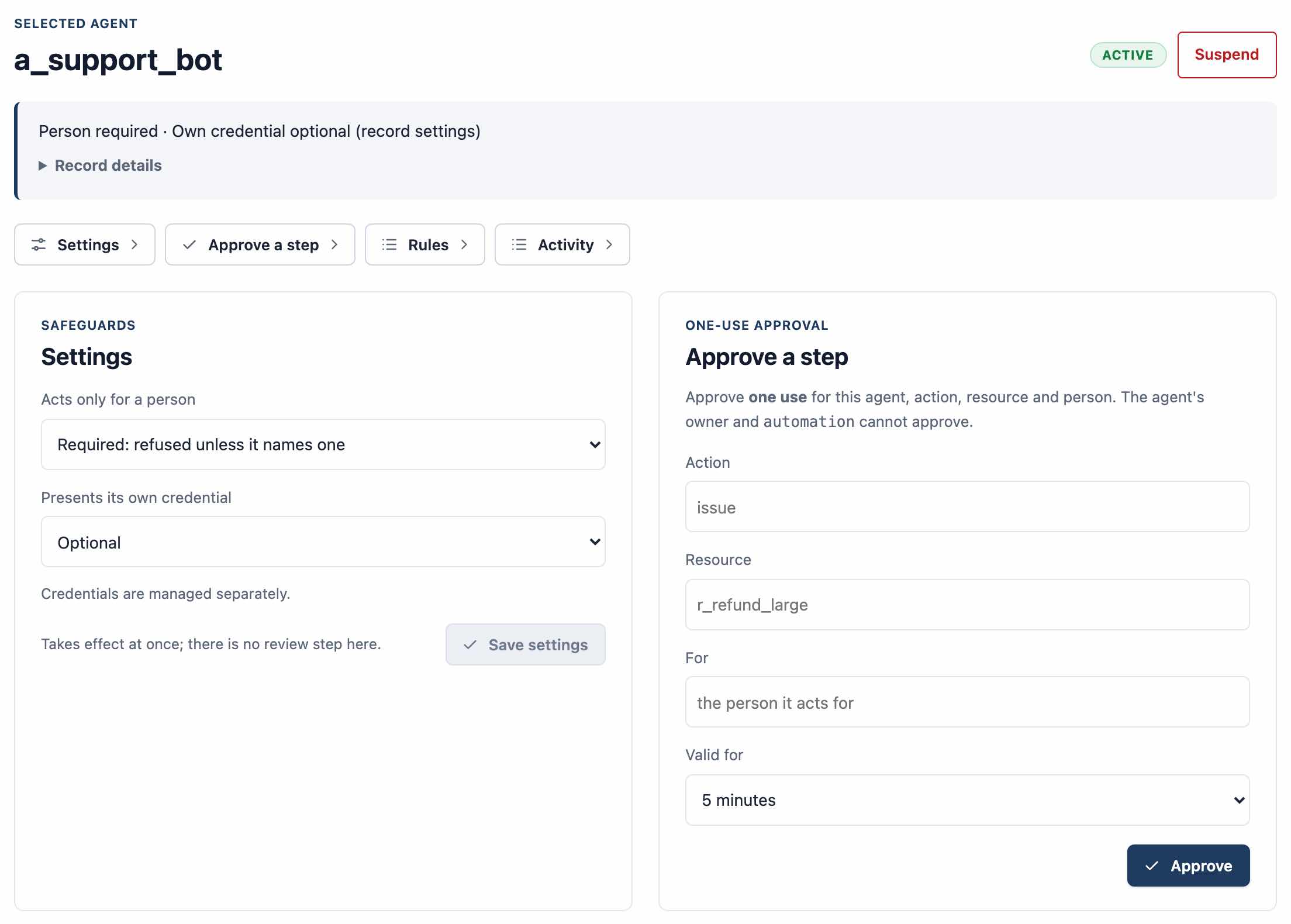
An agent's page, marked active, with a Suspend button. Its safeguards say whether it must act for a person and whether it must present its own credential. Beside them, a one-use approval form names an action, a resource, the person the agent acts for and how long the approval is valid, with an Approve button.
Where the second case study's switch lives: an agent's own page, with its status and the Suspend switch, the safeguards it must meet when it calls, and a person's approval for one use of one action. Enlarge

Case study 3 · From a pilot to production

Investigating orders with controlled AI access

A business wants to keep what an AI pilot gave it while proving where the agent's authority stops. A procurement specialist's assistant investigates purchase orders through a read-only tool, and Caroline decides each call before the tool runs.

  • A permitted investigation returns a finding from the tool.
  • Asked about another organisation's order, the same assistant is refused, and the tool is never invoked.
  • Reading and changing are separate authority: the read-only tool runs no resend or restart.
  • Withdrawing the agent's access refuses its next request, and restoring it is checked against the change it undoes.
  • The decision, the tool's execution and the backend's receipt are kept as separate evidence, the ground for agreeing the next use case and its sandbox criteria.
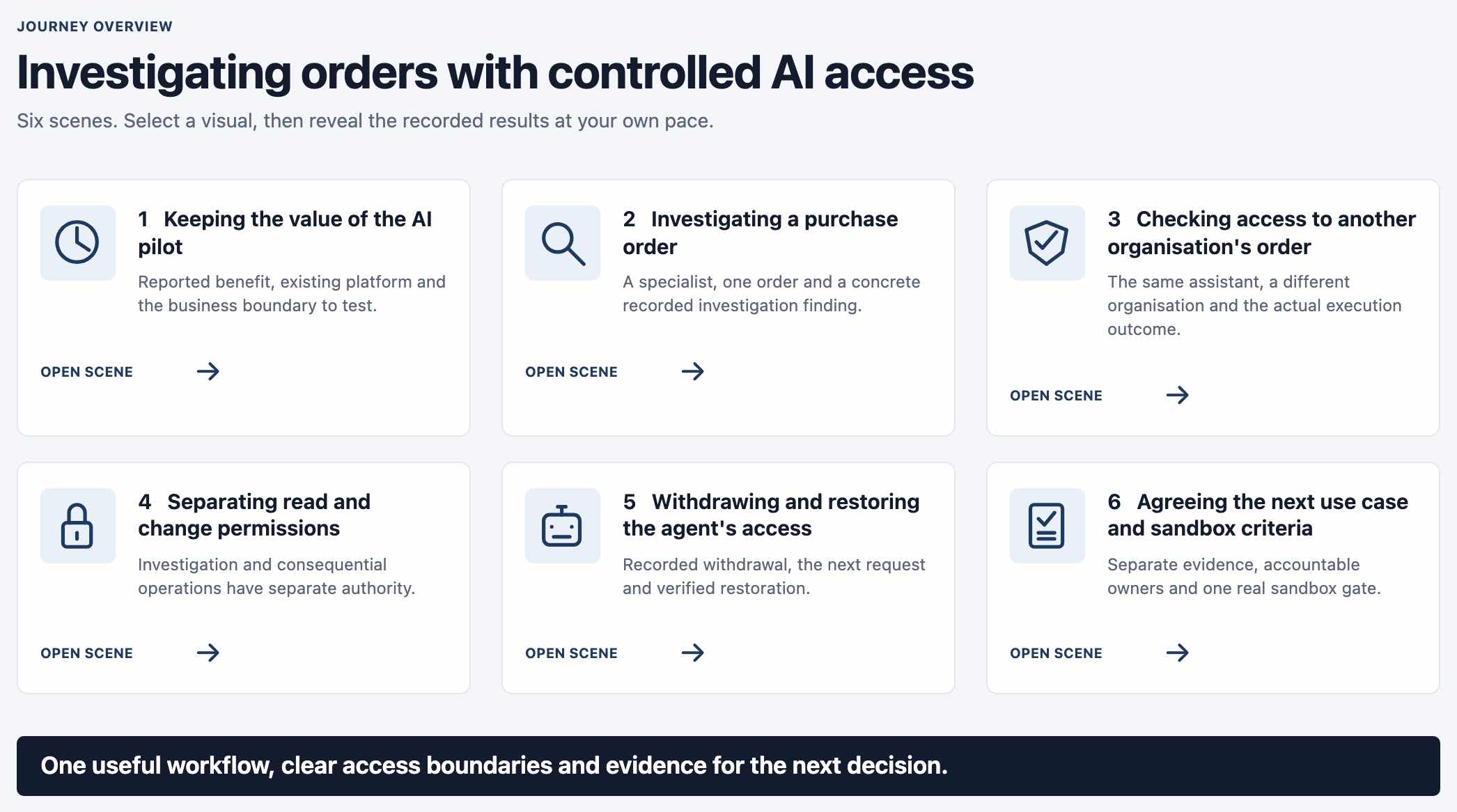
An overview titled Investigating orders with controlled AI access, with six scene cards: keeping the value of the AI pilot; investigating a purchase order; checking access to another organisation's order; separating read and change permissions; withdrawing and restoring the agent's access; agreeing the next use case and sandbox criteria.
The third case study's overview: six scenes, from what the pilot delivered to the criteria for a sandbox. Enlarge

Case study 4 · NIS2 readiness

Six NIS2 situations, each with its evidence

Six journeys, one for each kind of organisation the directive reaches, from an energy or water operator to a regional hospital. Each makes a useful action, its boundary and the evidence behind it visible, decided by the policy engine in an isolated sandbox with fictional identities.

  • A supplier gets only the access its fault ticket needs, and is refused the neighbouring installation.
  • An urgent patch goes through the approved route, and an unapproved production change is refused.
  • Incident reporting, recovery from a verified point, and evidence shared only within the approved boundary.
  • Management sees which controls work and where gaps remain.
  • It supports the discussion of selected NIS2 controls and their evidence. It does not certify compliance, and the organisation's own scope assessment comes first.
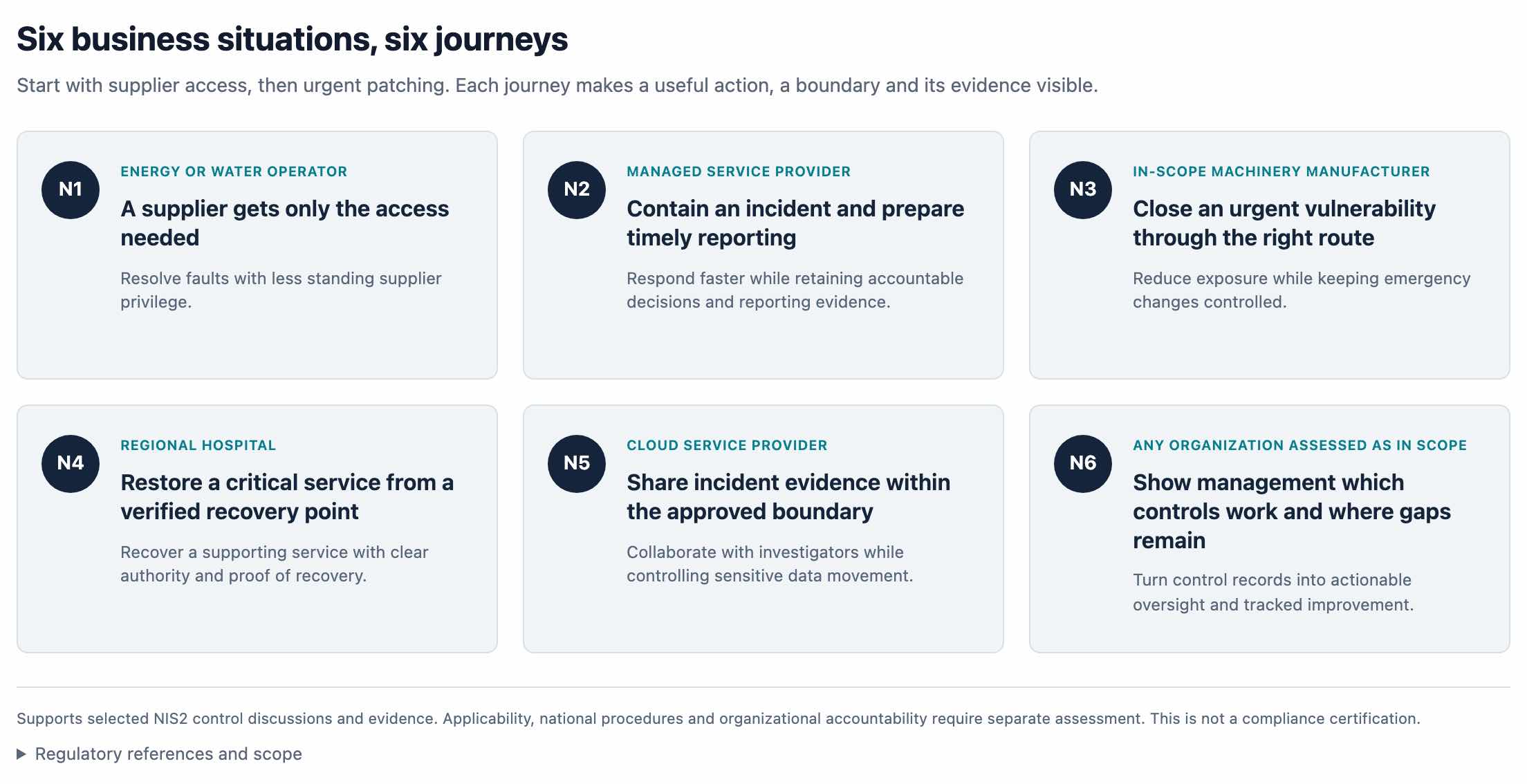
Six cards under the heading Six business situations, six journeys: an energy or water operator, a managed service provider, an in-scope machinery manufacturer, a regional hospital, a cloud service provider, and any organisation assessed as in scope. A note under them says the journeys support selected NIS2 control discussions and evidence and are not a compliance certification.
The six journeys as the app presents them, each for a kind of organisation the directive reaches. Enlarge

Authoring and testing

The authoring console and the decision tester

Caroline puts authoring first: the console where rules are written, tested and reviewed comes before the decision point that evaluates them.

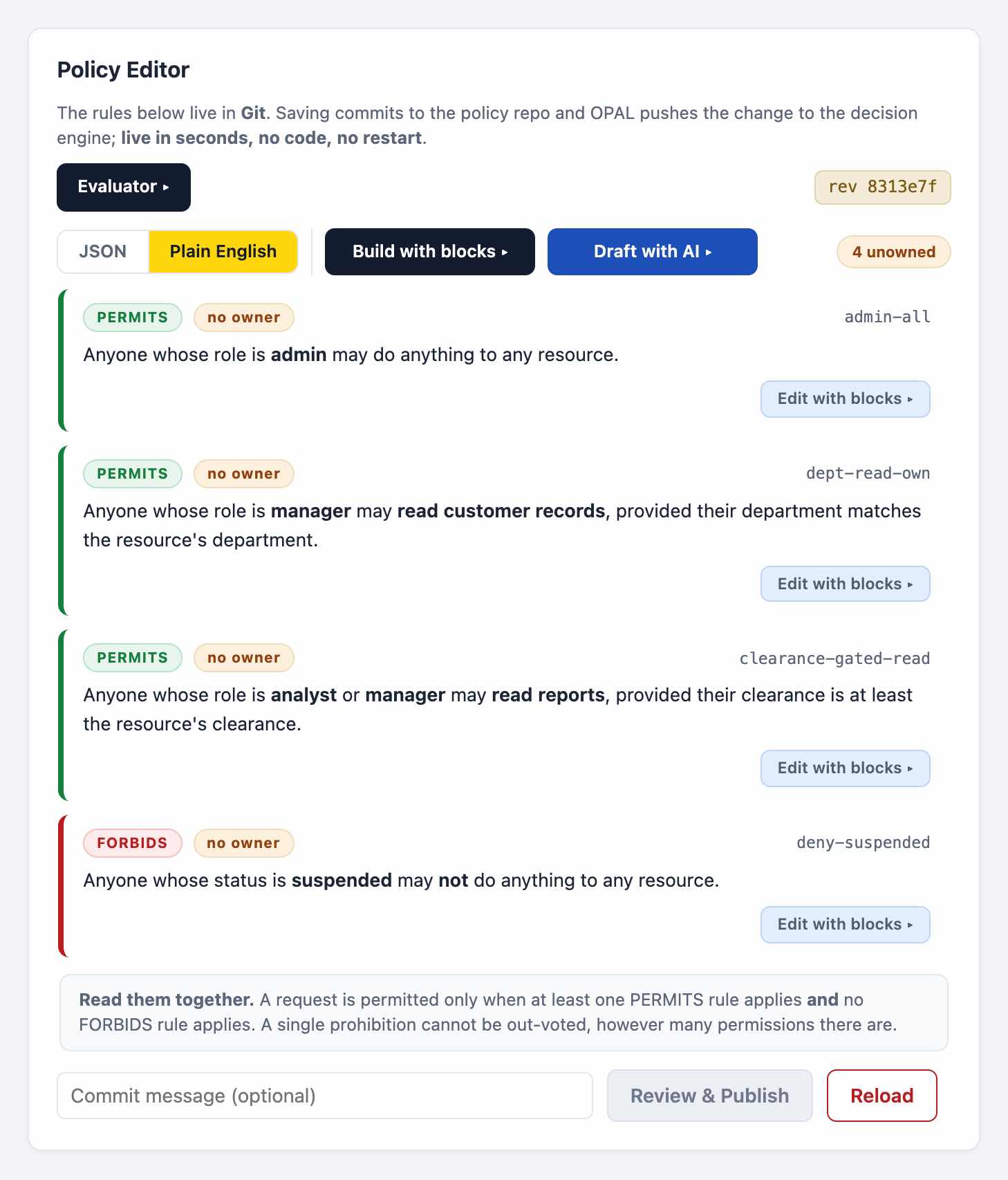
The policy editor in plain-English view. Four rules are read back as sentences, three that permit and one that forbids, each beside its rule identifier, above a note on how they combine.
The live rules read back as sentences. A request is allowed only when a permit applies and no prohibition does. Enlarge
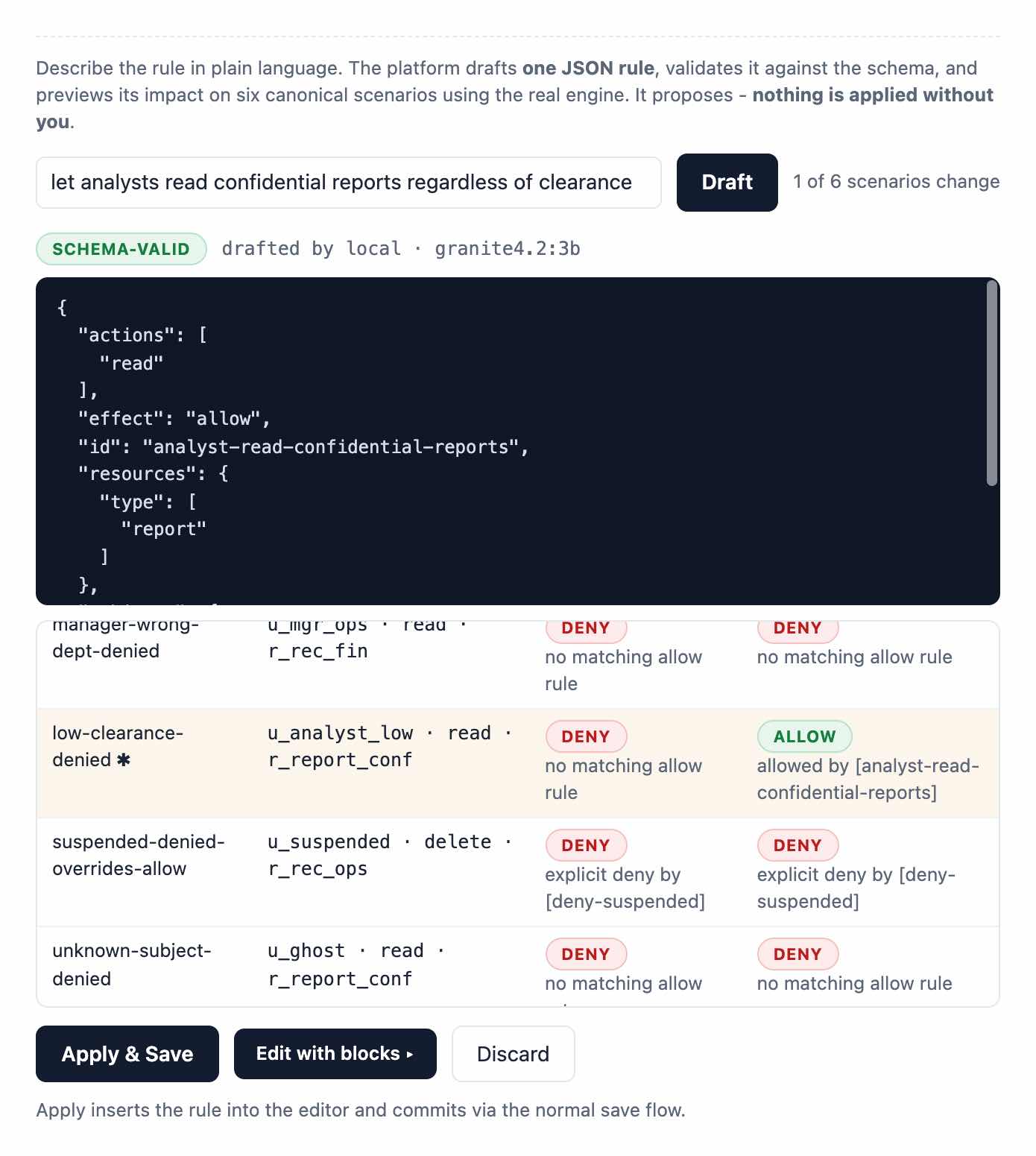
Drafting a rule with AI. A sentence asks to let analysts read confidential reports regardless of clearance. A model running locally drafts one JSON rule marked schema-valid, and a table of canonical scenarios shows the one decision that would change, from DENY to ALLOW, before anything is applied.
Asked for in one sentence, drafted by a model running locally, and marked schema-valid. Before anything is applied, the table shows the one scenario of six whose answer would change. Enlarge
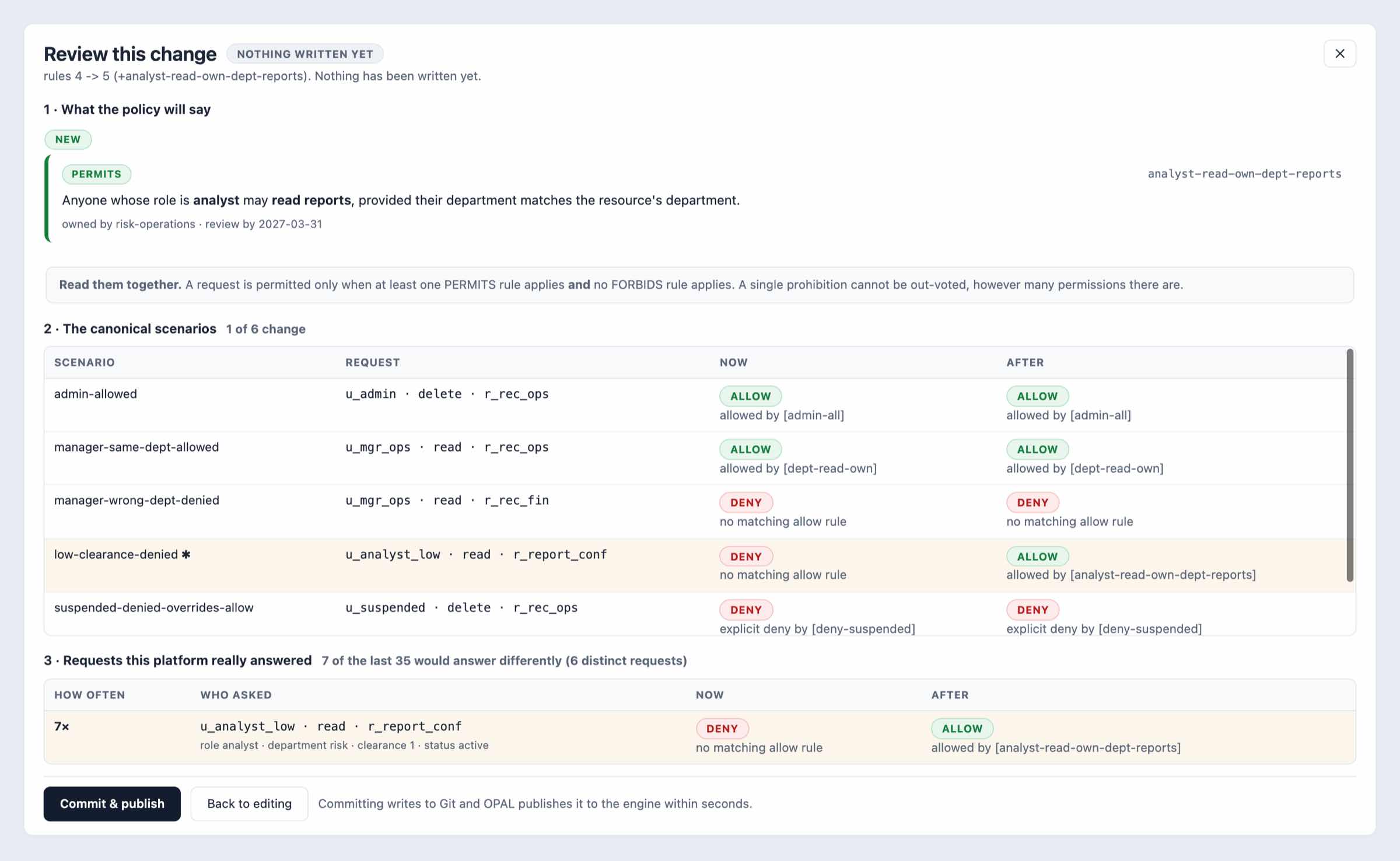
Reviewing a change before it is written. The new rule is shown as a sentence with its owner and review date. A table of six canonical scenarios shows the one whose answer changes, from DENY to ALLOW, and a second table shows that 7 of the last 35 real requests would now be answered differently.
A change under review, with nothing written yet. Besides the test scenarios, it checks the requests the engine has actually answered: 7 of the last 35 would now get a different answer. Enlarge
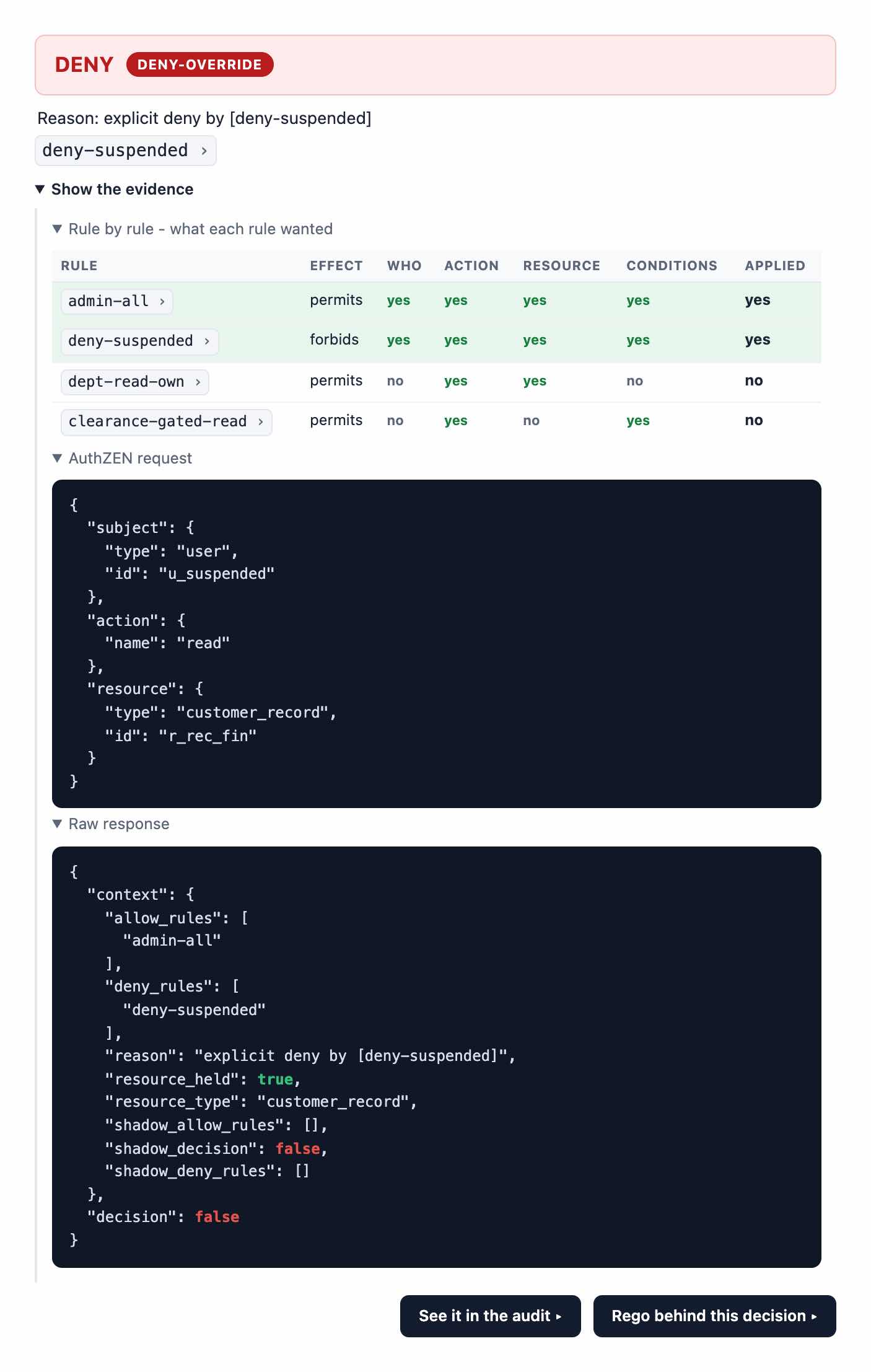
A denial with its evidence open. A table checks each rule against the request and shows that both admin-all and deny-suspended applied. Below it are the AuthZEN request and the engine's raw response, ending in decision false.
A refusal with its evidence open: each rule checked against the request, clause by clause, then the AuthZEN request and the engine's raw reply. Enlarge
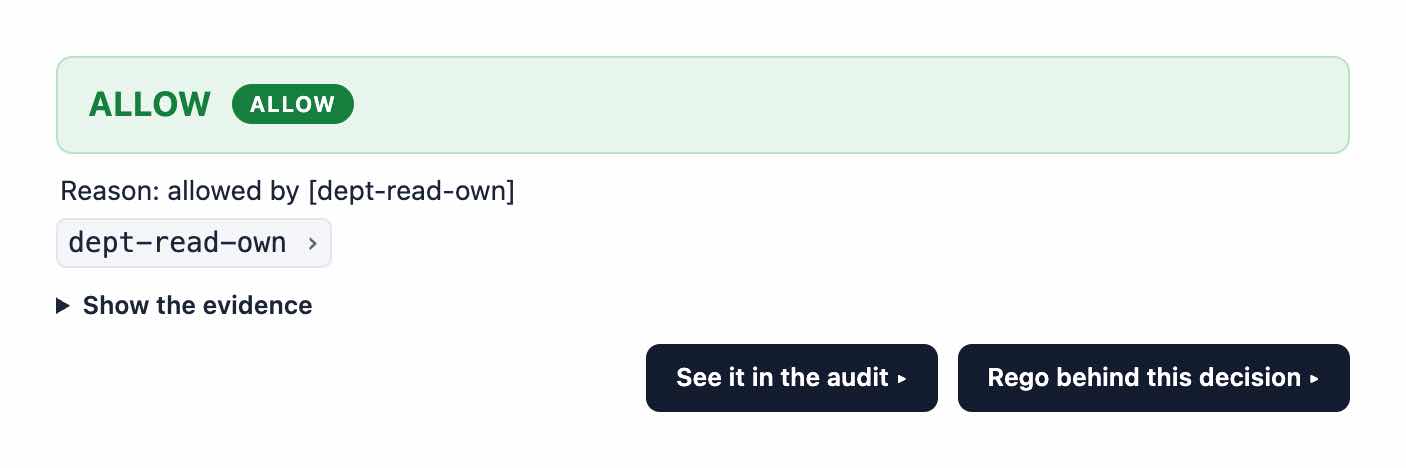
An ALLOW decision whose reason names the rule dept-read-own, with links to the evidence, the audit entry and the Rego behind the decision.
An allowed request names the rule that allowed it, and the evidence behind it is a click away. Enlarge
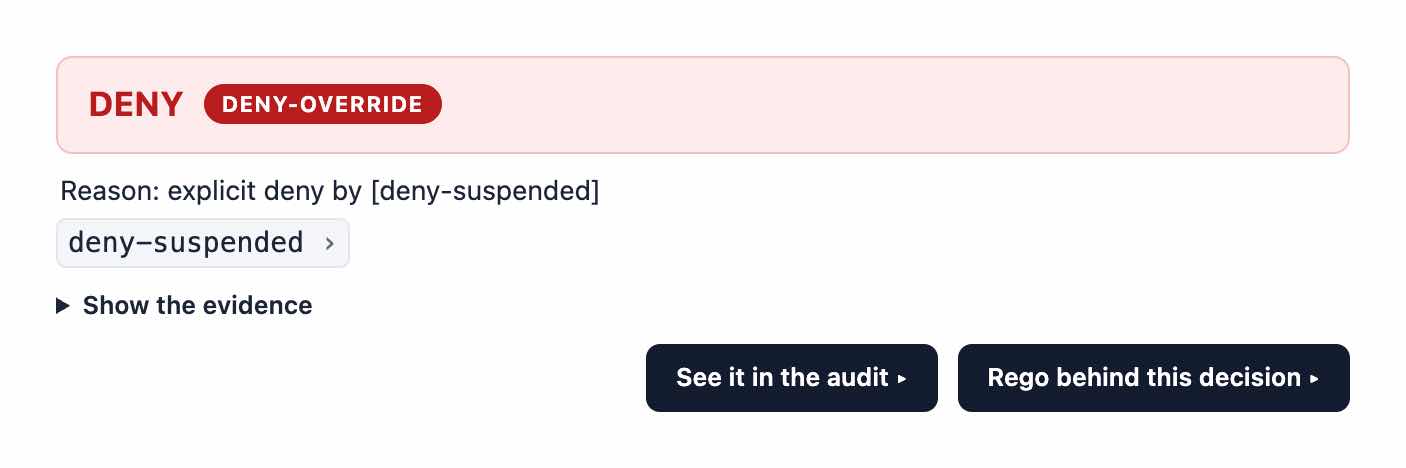
A DENY decision marked deny-override, whose reason names the explicit rule deny-suspended.
An explicit prohibition outranks every permission, and the refusal names the rule that stopped it. Enlarge
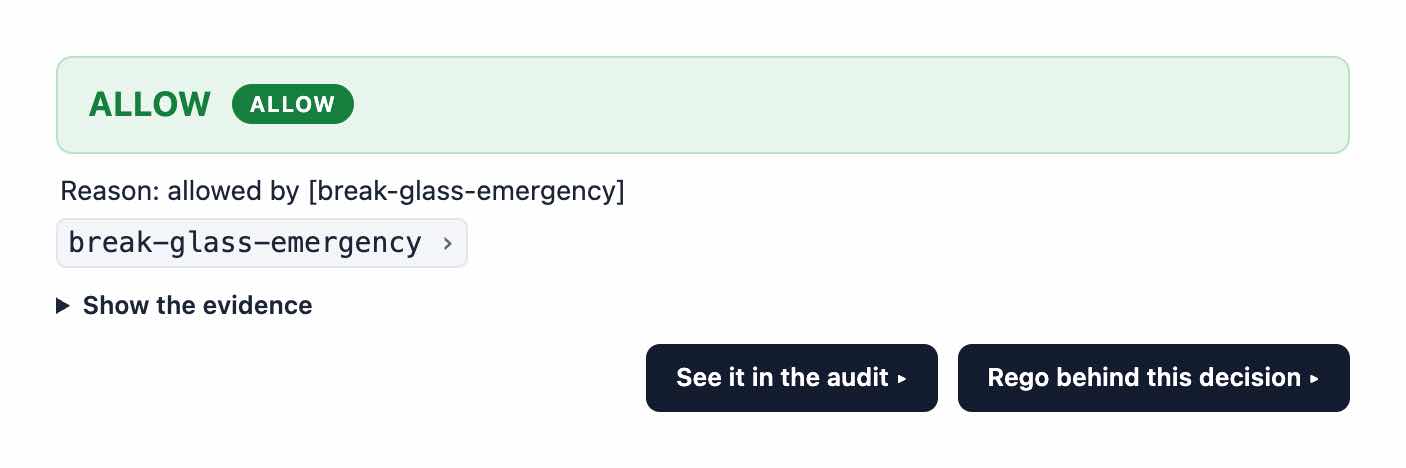
An ALLOW decision whose reason is the rule break-glass-emergency, with links to the evidence, the audit entry and the Rego behind the decision.
Access granted under break-glass. The reason is the emergency rule itself, so every such exception can be picked out of the audit. Enlarge

Measured

0.27 s
From a policy saved to an enforced decision, with the change recorded in Git.
0.06 s
From an attribute changed in its source system to its effect.
Under 5 ms
Decision latency.
Every decision
Names its rule, or reports that none matched.

These figures are measured on the firm's own installation of Caroline.

See Caroline decide

A walk-through runs the loop on the platform itself: a rule written and reviewed, a question put to the engine, and the answer found again in the decision log and the ledger.

Ask for a walk-through

The Decisions page. Counters give the total, allowed, denied and deny-override decisions, above a filter for each outcome and an Export CSV button. The table under them, headed Who asked, what happened, why, lists decisions about AI agents, each with the agent, the person it acted for, the action, the resource, the outcome, the deciding rule and the reason in words.

The decision log. Each line names the agent, the person it acted for, the outcome and the rule that decided, with the reason in words. Close

The engine trail: each query the decision engine answered, with its time, what it was asked, its answer and the time it took in microseconds. Under the table a line reports the retained ledger's records and that its chain was recomputed end to end and found intact.

The engine's own trail, each answer timed in microseconds. The line under it is the ledger check: every record kept, the chain recomputed end to end and intact. Close

The policy change history. Each rule change is a Git commit with its time, source and author. One was drafted by AI and approved; the open entry shows the new rule as a sentence, with its owner and review date.

Every change is a Git commit, including one drafted by AI and approved by a person. Each opens as the rule in plain English, with an owner and a review date. Close

Nine numbered scene cards: a person asks where her purchase order is; another organisation's order; the agent widens the search to sales orders; a stuck order, and whether the agent may resend it; the platform owner writes the rule; a resend without an approval; the operations lead approves and the agent retries; a log line tells the agent to export everything; the rule is withdrawn. Each card gives its planned outcome, such as Allow or Explicit refusal.

The first case study's nine scenes as the app lays them out, each with the answer the rules are expected to give. Close

An agent's page, marked active, with a Suspend button. Its safeguards say whether it must act for a person and whether it must present its own credential. Beside them, a one-use approval form names an action, a resource, the person the agent acts for and how long the approval is valid, with an Approve button.

Where the second case study's switch lives: an agent's own page, with its status and the Suspend switch, the safeguards it must meet when it calls, and a person's approval for one use of one action. Close

An overview titled Investigating orders with controlled AI access, with six scene cards: keeping the value of the AI pilot; investigating a purchase order; checking access to another organisation's order; separating read and change permissions; withdrawing and restoring the agent's access; agreeing the next use case and sandbox criteria.

The third case study's overview: six scenes, from what the pilot delivered to the criteria for a sandbox. Close

Six cards under the heading Six business situations, six journeys: an energy or water operator, a managed service provider, an in-scope machinery manufacturer, a regional hospital, a cloud service provider, and any organisation assessed as in scope. A note under them says the journeys support selected NIS2 control discussions and evidence and are not a compliance certification.

The six journeys as the app presents them, each for a kind of organisation the directive reaches. Close

The policy editor in plain-English view. Four rules are read back as sentences, three that permit and one that forbids, each beside its rule identifier, above a note on how they combine.

The live rules read back as sentences. A request is allowed only when a permit applies and no prohibition does. Close

Drafting a rule with AI. A sentence asks to let analysts read confidential reports regardless of clearance. A model running locally drafts one JSON rule marked schema-valid, and a table of canonical scenarios shows the one decision that would change, from DENY to ALLOW, before anything is applied.

Asked for in one sentence, drafted by a model running locally, and marked schema-valid. Before anything is applied, the table shows the one scenario of six whose answer would change. Close

Reviewing a change before it is written. The new rule is shown as a sentence with its owner and review date. A table of six canonical scenarios shows the one whose answer changes, from DENY to ALLOW, and a second table shows that 7 of the last 35 real requests would now be answered differently.

A change under review, with nothing written yet. Besides the test scenarios, it checks the requests the engine has actually answered: 7 of the last 35 would now get a different answer. Close

A denial with its evidence open. A table checks each rule against the request and shows that both admin-all and deny-suspended applied. Below it are the AuthZEN request and the engine's raw response, ending in decision false.

A refusal with its evidence open: each rule checked against the request, clause by clause, then the AuthZEN request and the engine's raw reply. Close

An ALLOW decision whose reason names the rule dept-read-own, with links to the evidence, the audit entry and the Rego behind the decision.

An allowed request names the rule that allowed it, and the evidence behind it is a click away. Close

A DENY decision marked deny-override, whose reason names the explicit rule deny-suspended.

An explicit prohibition outranks every permission, and the refusal names the rule that stopped it. Close

An ALLOW decision whose reason is the rule break-glass-emergency, with links to the evidence, the audit entry and the Rego behind the decision.

Access granted under break-glass. The reason is the emergency rule itself, so every such exception can be picked out of the audit. Close